Tools Reference
GeoMind uses an AI agent architecture where the LLM orchestrates a set of specialized geospatial tools. When you ask a question in natural language, the agent decides which tools to call, in what order, and with what parameters - all automatically.
Capabilities at a Glance
| Capability | Description | Example Query |
|---|---|---|
| Imagery Search | Find recent Sentinel-2 scenes for any location | "Find recent imagery of Tokyo" |
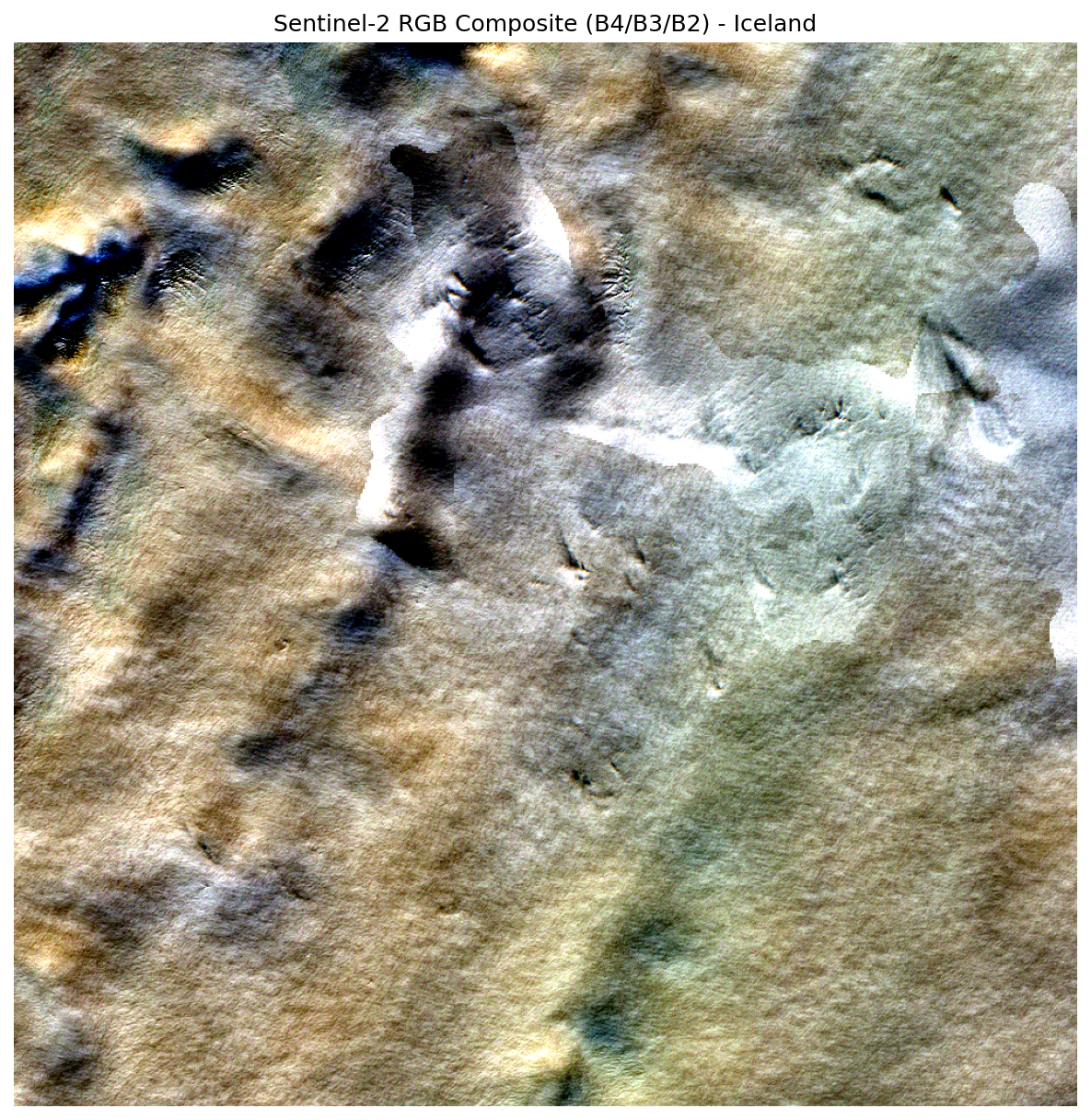
| RGB Composites | Generate true-color satellite images (B04+B03+B02) | "Create an RGB composite for the most recent image of Iceland" |
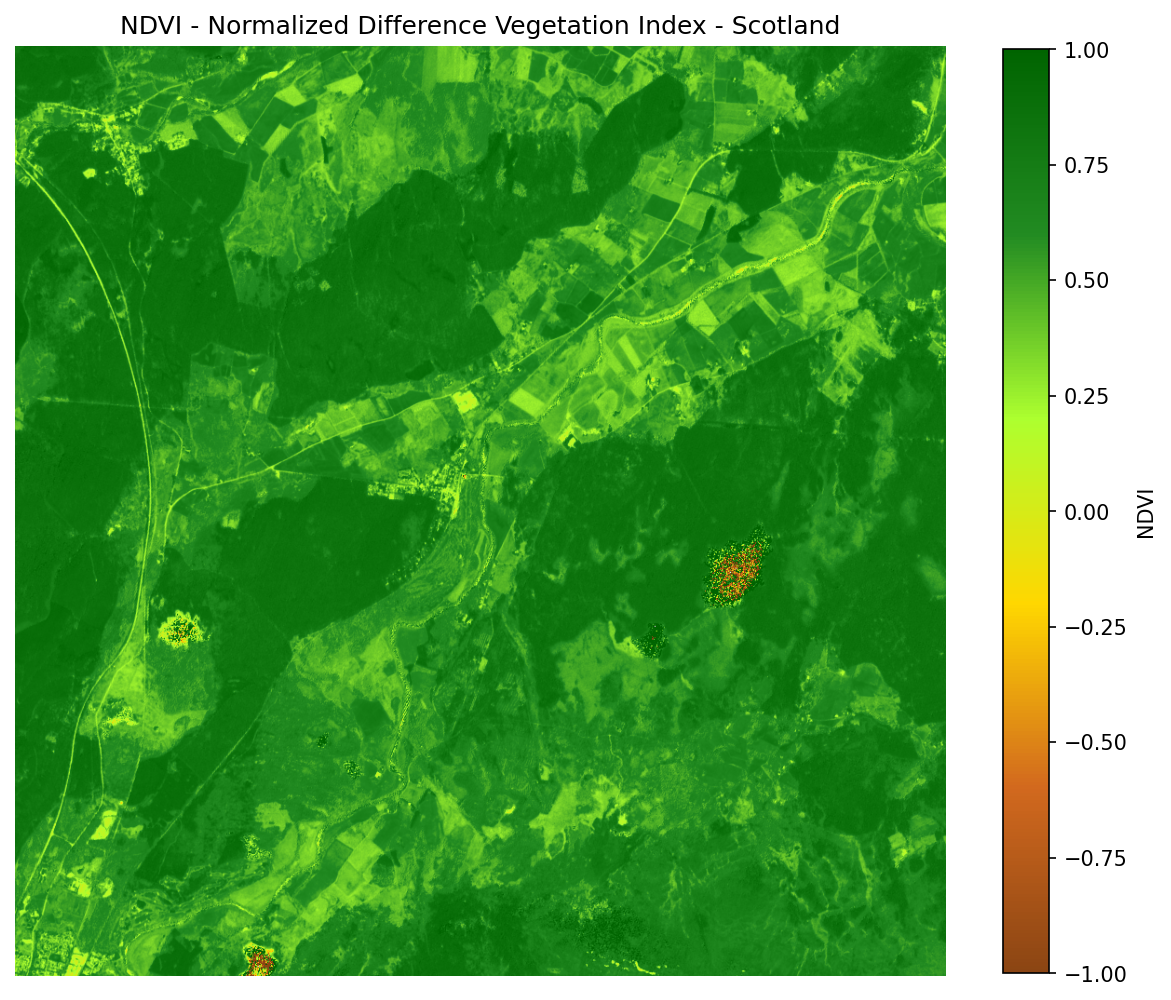
| NDVI Calculation | Compute vegetation indices with statistics | "Show me NDVI data for the Amazon rainforest" |
| Cloud Filtering | Filter imagery by cloud cover percentage | "Search for images with less than 10% cloud cover in London" |
| Band Statistics | Get min/max/mean/std for any spectral band | "Get band statistics for this scene" |
| Geocoding | Convert any place name to coordinates and bounding box | "Get satellite data for coordinates 40.7128, -74.0060" |
| Multi-Step Queries | Chain tools automatically in a single request | "Get me recent image of Scotland and its NDVI" |
Tool Overview
GeoMind's tools are organized into three layers:
graph LR
    Query["Your Query"] --> Agent["GeoMind Agent"]
    Agent --> G["Geocoding"]
    Agent --> S["STAC Search"]
    Agent --> P["Processing"]
    Agent --> M["Metadata"]

    G --> G1["geocode_location"]
    G --> G2["get_bbox_from_location"]

    S --> S1["search_imagery"]
    S --> S2["list_recent_imagery"]
    S --> S3["get_item_details"]

    P --> P1["create_rgb_composite"]
    P --> P2["calculate_ndvi"]
    P --> P3["get_band_statistics"]

M --> M1["generate_croissant_metadata"]| Layer | Tools | Purpose |
|---|---|---|
| Geocoding | geocode_location, get_bbox_from_location |
Convert place names to coordinates and bounding boxes |
| STAC Search | search_imagery, list_recent_imagery, get_item_details |
Query the Sentinel-2 catalog for available scenes |
| Processing | create_rgb_composite, calculate_ndvi, get_band_statistics |
Stream and process satellite data into outputs |
| Metadata | generate_croissant_metadata |
Generate GeoCroissant JSON-LD ML metadata for a satellite scene |
Geocoding Tools
These tools convert human-readable place names into geographic coordinates used for satellite imagery queries.
geocode_location
Converts a place name to geographic coordinates using OpenStreetMap's Nominatim service.
Parameters:
| Parameter | Type | Required | Description |
|---|---|---|---|
place_name |
string | Yes | Location name (e.g., "New York", "Paris, France", "Central Park") |
Returns: Latitude, longitude, and full resolved address.
Example:
> Find the coordinates of Central Park, New York

geocode_location("Central Park, New York")
-> { latitude: 40.7828, longitude: -73.9653, address: "Central Park, Manhattan, New York..." }
get_bbox_from_location
Converts a place name to a bounding box suitable for STAC catalog queries. It geocodes the location and creates a square bounding box with a configurable buffer.
Parameters:
| Parameter | Type | Required | Default | Description |
|---|---|---|---|---|
place_name |
string | Yes | - | Location name |
buffer_km |
number | No | 15 km |
Buffer distance around the center point |
Returns: Bounding box [min_lon, min_lat, max_lon, max_lat] and center point.
Example:
get_bbox_from_location("London", buffer_km=10)
-> { bbox: [-0.23, 51.41, -0.02, 51.60], center: {lat: 51.5074, lon: -0.1278} }
How the Buffer Works
The buffer creates a square area around the geocoded point.
1 degree latitude = ~111 km1 degree longitude = ~111 x cos(latitude) km
A 15 km buffer at London's latitude produces roughly a 30 km x 30 km search area.
STAC Search Tools
These tools query the Sentinel-2 STAC catalog to find available Level-2A imagery.
list_recent_imagery
The most commonly used tool. It combines geocoding and STAC search into a single step - just provide a location name and it finds recent imagery automatically.
Parameters:
| Parameter | Type | Required | Default | Description |
|---|---|---|---|---|
location_name |
string | No | - | Location name (auto-geocoded) |
days |
integer | No | 14 |
Number of days to look back |
max_cloud_cover |
number | No | 50% |
Maximum cloud cover percentage |
max_items |
integer | No | 20 |
Maximum number of results |
Returns: A list of matching STAC items with metadata and Zarr asset URLs.
Example:
> Find recent Sentinel-2 imagery of Paris

Executing: list_recent_imagery({'location_name': 'Paris'})

Found 5 recent images for Paris:
1. S2B_MSIL2A_20260228T... - Cloud: 12% - Date: 2026-02-28
2. S2A_MSIL2A_20260225T... - Cloud: 8%  - Date: 2026-02-25
...
Smart Search Extension
If no results are found within the default timeframe, list_recent_imagery automatically extends the search period to find available data.
search_imagery
Advanced search with explicit parameters - use this when you need precise control over the search area, date range, and filters.
Parameters:
| Parameter | Type | Required | Default | Description |
|---|---|---|---|---|
bbox |
array | No | - | Bounding box [min_lon, min_lat, max_lon, max_lat] |
start_date |
string | No | - | Start date in YYYY-MM-DD format |
end_date |
string | No | - | End date in YYYY-MM-DD format |
max_cloud_cover |
number | No | 50% |
Maximum cloud cover % |
max_items |
integer | No | 20 |
Maximum results |
Example:
> Search for images with less than 10% cloud cover in London

Executing: search_imagery({
    'bbox': [-0.23, 51.41, -0.02, 51.60],
    'start_date': '2026-02-01',
    'end_date': '2026-02-28',
    'max_cloud_cover': 10
})
get_item_details
Retrieves full metadata for a specific STAC item, including all available assets and Zarr URLs.
Parameters:
| Parameter | Type | Required | Description |
|---|---|---|---|
item_id |
string | Yes | The STAC item ID (e.g., "S2B_MSIL2A_20260219T125259_...") |
Returns: Complete item metadata including all Zarr asset endpoints.
Processing Tools
These tools load Sentinel-2 data from cloud-hosted Zarr stores and create visualizations. No local download required - data is streamed via HTTP range requests.
create_rgb_composite
Creates a true-color RGB composite image from Sentinel-2 10 m resolution bands (B04 Red, B03 Green, B02 Blue).
Parameters:
| Parameter | Type | Required | Default | Description |
|---|---|---|---|---|
zarr_url |
string | Yes | - | URL to the SR_10m Zarr asset |
location_name |
string | No | - | Location name for the image title |
subset_size |
integer | No | 1000 |
Output image dimensions (pixels) |
Returns: Path to saved PNG and image metadata.
Processing Pipeline:
- Stream B04, B03, B02 band data via HTTP range requests (~1-5 MB total)
- Apply scale/offset:
Reflectance = (DN x 0.0001) + (-0.1) - Stack bands into RGB composite
- Normalize using 2-98% percentile stretch for optimal contrast
- Save to
outputs/rgb_composite_XXXX.png
Example:
> Create an RGB composite for the most recent image of Iceland

Executing: create_rgb_composite({
    'zarr_url': '.../.../r10m',
    'location_name': 'Iceland'
})

- Output file: outputs/rgb_composite_254.png
- Image size: 1000 x 1000 px
- Bands used: Red (B04), Green (B03), Blue (B02)
calculate_ndvi
Computes the Normalized Difference Vegetation Index (NDVI) from B08 (NIR) and B04 (Red) bands.
Formula: NDVI = (NIR - Red) / (NIR + Red)
Parameters:
| Parameter | Type | Required | Default | Description |
|---|---|---|---|---|
zarr_url |
string | Yes | - | URL to the SR_10m Zarr asset |
location_name |
string | No | - | Location name for the image title |
subset_size |
integer | No | 1000 |
Output image dimensions (pixels) |
Returns: NDVI statistics (min, max, mean, std) and path to the saved colormap image.
NDVI Interpretation:
| NDVI Range | Interpretation |
|---|---|
| < 0 | Water, snow, clouds |
| 0.0 – 0.1 | Bare soil, rock, sand |
| 0.1 – 0.3 | Sparse vegetation, shrubs |
| 0.3 – 0.6 | Moderate vegetation |
| 0.6 – 0.9 | Dense, healthy vegetation |
Example:
> get me recent image of scotland and its ndvi

Executing: calculate_ndvi({...})

NDVI statistics:
- Minimum: -724775
- Maximum: 161061
- Mean: -16.43
- Standard deviation: 2447.43
get_band_statistics
Retrieves statistical summaries (min, max, mean, standard deviation) for specified spectral bands from a Sentinel-2 Zarr asset.
Parameters:
| Parameter | Type | Required | Default | Description |
|---|---|---|---|---|
zarr_url |
string | Yes | - | URL to the Zarr asset |
bands |
array | No | All available | List of band names to analyze |
Returns: Per-band statistics dictionary.
Metadata Tools
These tools generate machine-readable ML metadata for Sentinel-2 scenes using the GeoCroissant standard.
generate_croissant_metadata
Generates a GeoCroissant JSON-LD metadata file for a Sentinel-2 STAC item. The output conforms to both Croissant 1.1 and GeoCroissant 1.0 and passes mlcroissant validate without errors.
Parameters:
| Parameter | Type | Required | Default | Description |
|---|---|---|---|---|
item_id |
string | Yes | - | STAC item ID (e.g. S2B_MSIL2A_20260301...) |
location_name |
string | No | - | Location name embedded in the dataset description |
output_path |
string | No | outputs/croissant_<id>.json |
Custom path to write the JSON-LD file |
Returns: Dictionary with success, output_path, item_id, and croissant_metadata keys.
What the output includes:
| Section | GeoCroissant Field | Description |
|---|---|---|
| Dataset identity | @id, name, description |
Unique STAC item identifier |
| Spatial coverage | spatialCoverage.geo.box |
Bounding box in WGS-84 decimal degrees |
| CRS | geocr:coordinateReferenceSystem |
EPSG:4326 |
| Resolution | geocr:spatialResolution |
10 m (native Sentinel-2 resolution) |
| Temporal coverage | temporalCoverage |
ISO 8601 acquisition datetime |
| Band configuration | geocr:bandConfiguration |
Total bands + ordered band names |
| Asset distribution | cr:FileObject |
Product Zarr URL |
| Band fields | cr:Field per band |
Extraction path within the Zarr hierarchy |
| Citation | citeAs |
Auto-generated BibTeX entry |
| Licence | license |
CC BY 4.0 |
Pipeline:
flowchart LR
    A["item_id"] --> B["Fetch STAC item\nbbox, datetime, assets"]
    B --> C["Build JSON-LD context\nCroissant + GeoCroissant prefixes"]
    C --> D["Map product URL\n→ cr:FileObject"]
    D --> E["Map bands\n→ cr:Field with extract paths"]
    E --> F["Add geocr:*\nCRS, resolution, bandConfig"]
    F --> G["Save outputs/\ncroissant_<item_id>_<id>.json"]
Example:
> get me any iceland recent image geocroissant metadata

  Executing: list_recent_imagery({'location_name': 'Iceland'})
  Executing: generate_croissant_metadata({
      'item_id': 'S2B_MSIL2A_20260301T125259_N0512_R138_T27WXN_20260301T163056',
      'location_name': 'Iceland'
  })

GeoCroissant metadata saved:
  outputs/croissant_S2B_MSIL2A_20260301T125259_N0512_R138_T27WXN_20260301T163056_6007.json
Validate the output:
mlcroissant validate --jsonld=outputs/croissant_S2B_MSIL2A_20260301T125259_N0512_R138_T27WXN_20260301T163056_6007.json
# I0302 11:15:39.058333 13472 validate.py:53] Done.
Zero Errors
GeoMind's output passes mlcroissant validate with no errors or warnings on every generated file.
Direct Python Usage
You can call the tool directly without the agent:
Sentinel-2 Bands Reference
GeoMind works with Sentinel-2 Level-2A (surface reflectance) data.
| Band | Name | Wavelength (µm) | Resolution (m) | Common Use |
|---|---|---|---|---|
| B01 | Coastal Aerosol | 0.443 | 60 | Atmospheric correction |
| B02 | Blue | 0.490 | 10 | RGB composites |
| B03 | Green | 0.560 | 10 | RGB composites |
| B04 | Red | 0.665 | 10 | RGB composites, NDVI |
| B05 | Red Edge 1 | 0.704 | 20 | Vegetation analysis |
| B06 | Red Edge 2 | 0.740 | 20 | Vegetation analysis |
| B07 | Red Edge 3 | 0.783 | 20 | Vegetation analysis |
| B08 | NIR | 0.842 | 10 | NDVI |
| B8A | Narrow NIR | 0.865 | 20 | Vegetation analysis |
| B09 | Water Vapour | 0.945 | 60 | Atmospheric correction |
| B11 | SWIR 1 | 1.610 | 20 | Moisture, snow detection |
| B12 | SWIR 2 | 2.190 | 20 | Geology, fire mapping |