Land Cover Classification with Python

!pip install rasterio
Collecting rasterio
  Downloading rasterio-1.4.3-cp310-cp310-manylinux_2_17_x86_64.manylinux2014_x86_64.whl.metadata (9.1 kB)
Collecting affine (from rasterio)
  Downloading affine-2.4.0-py3-none-any.whl.metadata (4.0 kB)
Requirement already satisfied: attrs in /usr/local/lib/python3.10/dist-packages (from rasterio) (24.2.0)
Requirement already satisfied: certifi in /usr/local/lib/python3.10/dist-packages (from rasterio) (2024.8.30)
Requirement already satisfied: click>=4.0 in /usr/local/lib/python3.10/dist-packages (from rasterio) (8.1.7)
Collecting cligj>=0.5 (from rasterio)
  Downloading cligj-0.7.2-py3-none-any.whl.metadata (5.0 kB)
Requirement already satisfied: numpy>=1.24 in /usr/local/lib/python3.10/dist-packages (from rasterio) (1.26.4)
Collecting click-plugins (from rasterio)
  Downloading click_plugins-1.1.1-py2.py3-none-any.whl.metadata (6.4 kB)
Requirement already satisfied: pyparsing in /usr/local/lib/python3.10/dist-packages (from rasterio) (3.2.0)
Downloading rasterio-1.4.3-cp310-cp310-manylinux_2_17_x86_64.manylinux2014_x86_64.whl (22.2 MB)
   ━━━━━━━━━━━━━━━━━━━━━━━━━━━━━━━━━━━━━━━━ 22.2/22.2 MB 56.2 MB/s eta 0:00:00
Downloading cligj-0.7.2-py3-none-any.whl (7.1 kB)
Downloading affine-2.4.0-py3-none-any.whl (15 kB)
Downloading click_plugins-1.1.1-py2.py3-none-any.whl (7.5 kB)
Installing collected packages: cligj, click-plugins, affine, rasterio
Successfully installed affine-2.4.0 click-plugins-1.1.1 cligj-0.7.2 rasterio-1.4.3
import geopandas as gpd
from sklearn.ensemble import RandomForestClassifier
from sklearn.model_selection import train_test_split
from sklearn.metrics import confusion_matrix, ConfusionMatrixDisplay, classification_report
import rasterio as rio
from rasterio.enums import Resampling
import json
import pandas as pd
from matplotlib.colors import ListedColormap
import matplotlib.pyplot as plt
import numpy as np
import matplotlib.patches as mpatches
from PIL import ImageColor
import skimage as ski
from skimage.exposure import rescale_intensity
import scipy
from rasterio.features import shapes
# Location of data
lc_dir = '/content/data/lc.json'
sample_dir = "/content/data/Sample_LC_v1.geojson"
palsar_dir = "https://storage.googleapis.com/gee-ramiqcom-bucket/youtube/lc_python/Palsar_Kerinci_2023_v1.tif"
landsat_dir = "https://storage.googleapis.com/gee-ramiqcom-bucket/youtube/lc_python/Landsat_Kerinci_2023_v1.tif"
# Load Land Cover Parameter
lc = json.load(open(lc_dir))
lc_df = pd.DataFrame(lc)
lc_df["values_normalize"] = lc_df.index + 1
lc_df["palette"] = "#" + lc_df["palette"]

# Mapping from old to new values
values = lc_df["values"].to_list()
values_norm = lc_df["values_normalize"].to_list()
palette = lc_df["palette"].to_list()
labels = lc_df["label"].to_list()
dict_values = {}
dict_label = {}
dict_palette = {}
dict_palette_hex = {}
for x in range(0, len(values)):
    dict_values[values[x]] = values_norm[x]
    dict_label[values_norm[x]] = labels[x]
    dict_palette[values_norm[x]] = ImageColor.getrgb(palette[x])
    dict_palette_hex[values_norm[x]] = palette[x]

# Create colormap from values and palette
cmap = ListedColormap(palette)

# Patches legend
patches = [
    mpatches.Patch(color=palette[i], label=labels[i]) for i in range(len(values))
]
legend = {
    "handles": patches,
    "bbox_to_anchor": (1.05, 1),
    "loc": 2,
    "borderaxespad": 0.0,
}

lc_df
palette values label values_normalize
0 #006400 2001 Primary dryland forest 1
1 #228B22 2002 Secondary dryland forest 2
2 #4B0082 2004 Primary mangrove forest 3
3 #808000 2005 Primary swamp forest 4
4 #32CD32 2006 Plantation forest 5
5 #90EE90 2007 Dry shrub 6
6 #FF4500 2010 Estate crop 7
7 #F08080 2012 Settlement 8
8 #D2B48C 2014 Bare ground 9
9 #ADFF2F 3000 Savanna and grasses 10
10 #87CEFA 5001 Open water 11
11 #6A5ACD 20041 Secondary mangrove forest 12
12 #6B8E23 20051 Secondary swamp forest 13
13 #66CDAA 20071 Wet shrub 14
14 #FFD700 20091 Pure dry agriculture 15
15 #FFA500 20092 Mixed dry agriculture 16
16 #008080 20093 Paddy field 17
17 #E6E6FA 20094 Fish pond/aquaculture 18
18 #B22222 20121 Port or harbour 19
19 #C71585 20122 Transmigration areas 20
20 #A0522D 20141 Mining 21
21 #7FFFD4 50011 Swamp 22
# Load sample
sample = gpd.read_file(sample_dir)
sample["value"] = sample["lc"].map(dict_values)
sample["label"] = sample["value"].map(dict_label)

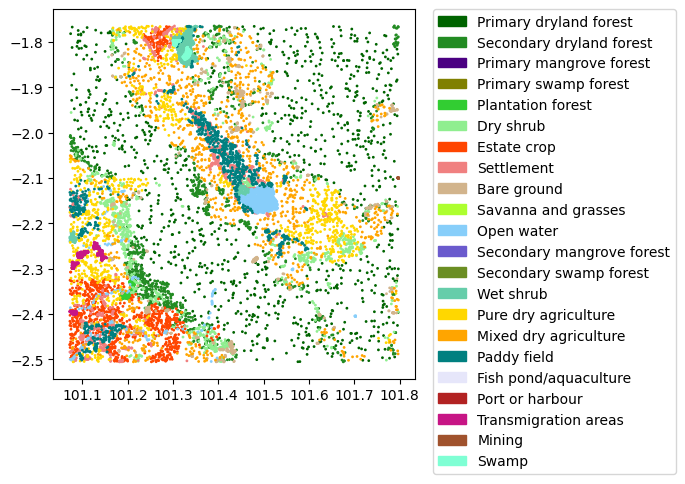
# Plot sample
sample.plot(column="value", cmap=cmap, markersize=1)
plt.legend(**legend)

# Sample with extract
sample_extract = sample.copy()
coords = [
    (x, y) for x, y in zip(sample_extract["geometry"].x, sample_extract["geometry"].y)
]
print(sample_extract.shape)
(14029, 5)

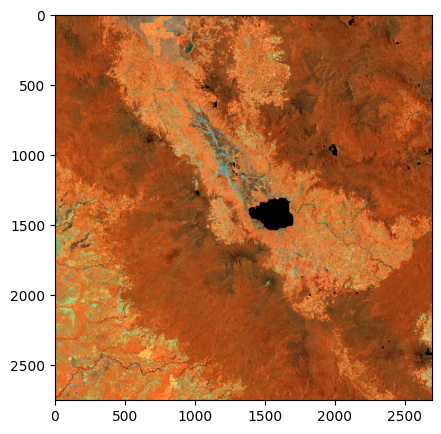
# Load landsat image
landsat = rio.open(landsat_dir)
landsat_image = landsat.read() / 1e4
# False color composite
out_range = (0, 1)
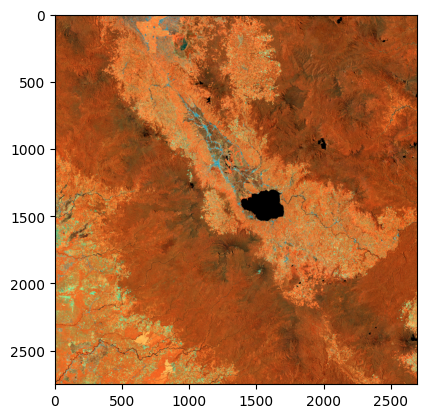
red = rescale_intensity(landsat_image[4], in_range=(0.1, 0.4), out_range=out_range)
green = rescale_intensity(landsat_image[5], in_range=(0.05, 0.3), out_range=out_range)
blue = rescale_intensity(landsat_image[6], in_range=(0.025, 0.25), out_range=out_range)
arr_image = np.stack(
    [red, green, blue]
).T
composite = np.rot90(np.flip(arr_image, 1), 1)

# Plot landsat image
plt.imshow(composite)

# Extract raster value
landsat_extract = np.stack(
    [x for x in landsat.sample(coords)]
) / 1e4
sample_extract[["B1", "B2", "B3", "B4", "B5", "B6", "B7", "B9"]] = landsat_extract
sample_extract
id lc geometry value label B1 B2 B3 B4 B5 B6 B7 B9
0 0 2001 POINT (101.67155 -1.86099) 1 Primary dryland forest 0.0091 0.0136 0.0321 0.0205 0.2243 0.0994 0.0408 0.0019
1 1 2001 POINT (101.43871 -2.23694) 1 Primary dryland forest 0.0101 0.0159 0.0439 0.0292 0.3572 0.1479 0.0560 0.0027
2 2 2001 POINT (101.49341 -1.77152) 1 Primary dryland forest 0.0205 0.0223 0.0389 0.0273 0.2772 0.1287 0.0554 0.0033
3 3 2001 POINT (101.75132 -2.02161) 1 Primary dryland forest 0.0058 0.0133 0.0385 0.0247 0.2979 0.1405 0.0579 0.0027
4 4 2001 POINT (101.1242 -1.96125) 1 Primary dryland forest 0.0174 0.0209 0.0400 0.0252 0.3285 0.1337 0.0543 0.0024
... ... ... ... ... ... ... ... ... ... ... ... ... ...
14024 14024 50011 POINT (101.32983 -1.83297) 22 Swamp 0.0187 0.0235 0.0419 0.0425 0.1372 0.1336 0.0820 0.0026
14025 14025 50011 POINT (101.33306 -1.82461) 22 Swamp 0.0205 0.0240 0.0407 0.0496 0.1509 0.1315 0.0788 0.0027
14026 14026 50011 POINT (101.33064 -1.8362) 22 Swamp 0.0239 0.0278 0.0546 0.0443 0.2668 0.1430 0.0719 0.0023
14027 14027 50011 POINT (101.30207 -1.80063) 22 Swamp 0.0315 0.0407 0.0621 0.0588 0.2338 0.1386 0.0839 0.0031
14028 14028 50011 POINT (101.32363 -1.8362) 22 Swamp 0.0213 0.0251 0.0450 0.0389 0.1899 0.1339 0.0697 0.0021

14029 rows × 13 columns

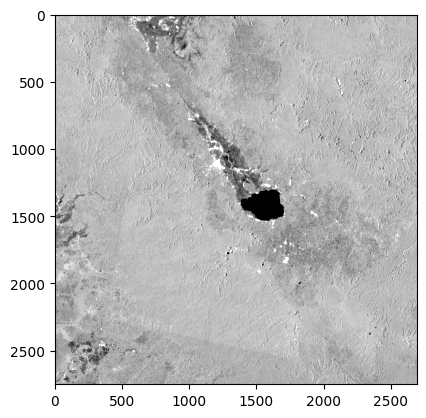
# Load palsar image
palsar = rio.open(palsar_dir)
palsar_image = palsar.read(
    out_shape=(palsar.count, landsat_image.shape[1], landsat_image.shape[2]),
    resampling=Resampling.bilinear,
) / 1e3
# Plot palsar image
plt.imshow(palsar_image[0], cmap="gray", vmin=-15, vmax=-5)

# Extract raster value
palsar_extract = np.stack([x for x in palsar.sample(coords)]) / 1e3
sample_extract[["HH", "HV"]] = palsar_extract
sample_extract
id lc geometry value label B1 B2 B3 B4 B5 B6 B7 B9 HH HV
0 0 2001 POINT (101.67155 -1.86099) 1 Primary dryland forest 0.0091 0.0136 0.0321 0.0205 0.2243 0.0994 0.0408 0.0019 -7.608 -11.281
1 1 2001 POINT (101.43871 -2.23694) 1 Primary dryland forest 0.0101 0.0159 0.0439 0.0292 0.3572 0.1479 0.0560 0.0027 -7.931 -11.993
2 2 2001 POINT (101.49341 -1.77152) 1 Primary dryland forest 0.0205 0.0223 0.0389 0.0273 0.2772 0.1287 0.0554 0.0033 -7.901 -11.999
3 3 2001 POINT (101.75132 -2.02161) 1 Primary dryland forest 0.0058 0.0133 0.0385 0.0247 0.2979 0.1405 0.0579 0.0027 -7.223 -11.135
4 4 2001 POINT (101.1242 -1.96125) 1 Primary dryland forest 0.0174 0.0209 0.0400 0.0252 0.3285 0.1337 0.0543 0.0024 -8.136 -12.624
... ... ... ... ... ... ... ... ... ... ... ... ... ... ... ...
14024 14024 50011 POINT (101.32983 -1.83297) 22 Swamp 0.0187 0.0235 0.0419 0.0425 0.1372 0.1336 0.0820 0.0026 -12.472 -19.294
14025 14025 50011 POINT (101.33306 -1.82461) 22 Swamp 0.0205 0.0240 0.0407 0.0496 0.1509 0.1315 0.0788 0.0027 -11.963 -19.554
14026 14026 50011 POINT (101.33064 -1.8362) 22 Swamp 0.0239 0.0278 0.0546 0.0443 0.2668 0.1430 0.0719 0.0023 -9.416 -15.761
14027 14027 50011 POINT (101.30207 -1.80063) 22 Swamp 0.0315 0.0407 0.0621 0.0588 0.2338 0.1386 0.0839 0.0031 -10.746 -18.832
14028 14028 50011 POINT (101.32363 -1.8362) 22 Swamp 0.0213 0.0251 0.0450 0.0389 0.1899 0.1339 0.0697 0.0021 -9.975 -15.855

14029 rows × 15 columns

# Split sample to train and test
seeds = 2
train, test = train_test_split(sample_extract, train_size=0.7, random_state=seeds)
print(f'Train size: {len(train)}\nTest size: {len(test)}')
Train size: 9820
Test size: 4209
# Make random forest model
predictors = ["B2", "B3", 'B4', 'B5', 'B6', 'B7', 'HH', 'HV']
model = RandomForestClassifier(100)
model.fit(
    train[predictors],
    train["value"]
)
RandomForestClassifier()
In a Jupyter environment, please rerun this cell to show the HTML representation or trust the notebook.
On GitHub, the HTML representation is unable to render, please try loading this page with nbviewer.org.
# Test model
test_apply = model.predict(test[predictors])

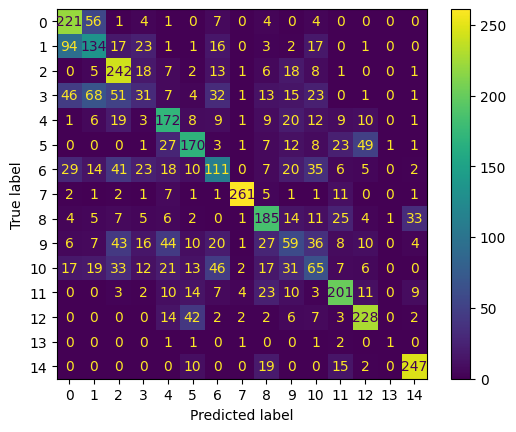
# Confusion matrix
cm = confusion_matrix(test['value'], test_apply)
display = ConfusionMatrixDisplay(cm)
display.plot()

# Report
report = classification_report(test['value'], test_apply)
print(report)
              precision    recall  f1-score   support

           1       0.53      0.74      0.62       298
           2       0.43      0.43      0.43       309
           5       0.53      0.75      0.62       322
           6       0.22      0.11      0.14       293
           7       0.51      0.61      0.56       280
           8       0.59      0.56      0.58       303
           9       0.42      0.35      0.38       321
          11       0.95      0.88      0.91       295
          14       0.57      0.61      0.59       303
          15       0.28      0.20      0.24       291
          16       0.28      0.22      0.25       289
          17       0.65      0.68      0.66       297
          20       0.70      0.74      0.72       308
          21       0.33      0.14      0.20         7
          22       0.82      0.84      0.83       293

    accuracy                           0.55      4209
   macro avg       0.52      0.53      0.51      4209
weighted avg       0.53      0.55      0.54      4209

# Load image
combine_image = np.concatenate((landsat_image, palsar_image), 0)
image_transpose = combine_image.T
transpose_shape = image_transpose.shape
table_image = pd.DataFrame(
    image_transpose.reshape(-1, transpose_shape[2]),
    columns=["B1", "B2", "B3", "B4", "B5", "B6", "B7", "B9", "HH", "HV"],
)
table_image
B1 B2 B3 B4 B5 B6 B7 B9 HH HV
0 0.0151 0.0165 0.0329 0.0213 0.2570 0.1103 0.0428 0.0023 -7.973 -12.063
1 0.0166 0.0184 0.0335 0.0215 0.2700 0.1119 0.0458 0.0025 -8.477 -12.280
2 0.0188 0.0198 0.0384 0.0216 0.3084 0.1288 0.0518 0.0026 -8.904 -12.676
3 0.0204 0.0221 0.0420 0.0241 0.3381 0.1348 0.0528 0.0025 -8.938 -13.058
4 0.0210 0.0231 0.0476 0.0274 0.3625 0.1518 0.0588 0.0024 -8.600 -13.174
... ... ... ... ... ... ... ... ... ... ...
7405687 0.0098 0.0139 0.0331 0.0209 0.2861 0.1183 0.0460 0.0026 -7.839 -11.874
7405688 0.0091 0.0137 0.0331 0.0202 0.2860 0.1191 0.0452 0.0027 -7.465 -11.422
7405689 0.0091 0.0136 0.0337 0.0208 0.2934 0.1197 0.0465 0.0027 -7.270 -11.149
7405690 0.0107 0.0146 0.0353 0.0207 0.2875 0.1156 0.0434 0.0027 -6.970 -11.184
7405691 0.0110 0.0146 0.0331 0.0205 0.2601 0.1142 0.0434 0.0026 -7.012 -11.148

7405692 rows × 10 columns

# Predict table image
prediction = model.predict(table_image[predictors])
prediction
array([1, 1, 1, ..., 1, 1, 1])
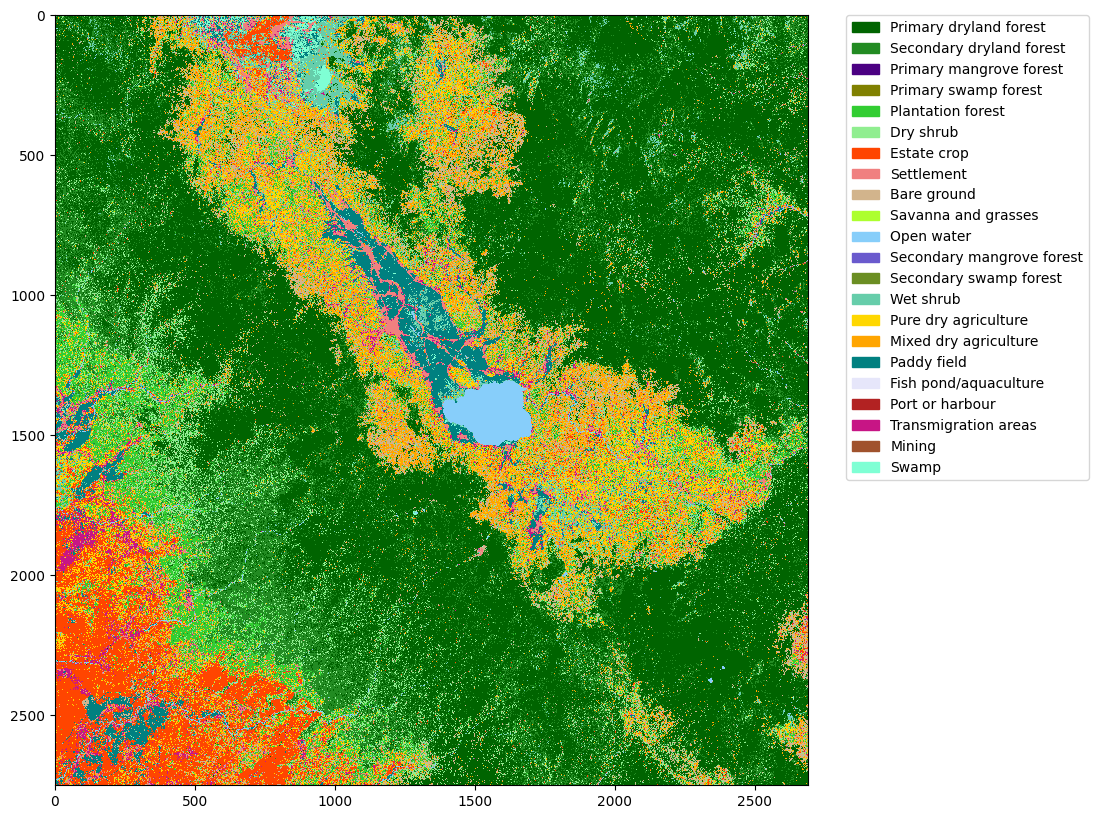
# Prediction to image again
prediction_image = np.rot90(np.flip(prediction.reshape(transpose_shape[0], transpose_shape[1]), 1), 1)

# Show to plot
plt.figure(figsize=(10, 10))
plt.imshow(prediction_image, cmap=cmap, interpolation="nearest")
plt.legend(**legend)

# Save image to geotiff
output = rio.open(
    "data/LULC.tif",
    "w",
    "COG",
    count=1,
    width=prediction_image.shape[1],
    height=prediction_image.shape[0],
    crs=landsat.crs,
    transform=landsat.transform,
    dtype="uint8",
    nodata=0,
    compress="lzw",
    resampling="mode",
    tiled=True,
)
output.write_colormap(1, dict_palette)
output.write(prediction_image, 1)
output.close()
# Image segmentation

# Do uniform filter to composite image
seed_image = composite
plt.figure(figsize=(5, 5))
plt.imshow(seed_image)

# Segmentation
segment = ski.segmentation.slic(
    seed_image, n_segments=10000, compactness=5, sigma=5
)
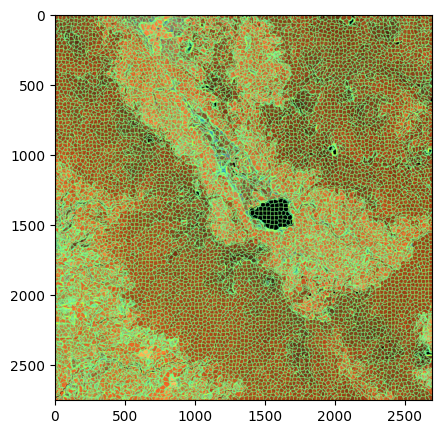
plt.figure(figsize=(5, 5))
plt.imshow(ski.segmentation.mark_boundaries(composite, segment, outline_color=(0, 255, 255)))

# Get the mode of each segment
segment_unique = np.unique(segment)
lc_segment = segment.copy()
for x in segment_unique:
    lc_segment[segment == x] = scipy.stats.mode(prediction_image[segment == x]).mode
lc_segment
array([[1, 1, 1, ..., 1, 1, 1],
       [1, 1, 1, ..., 1, 1, 1],
       [1, 1, 1, ..., 1, 1, 1],
       ...,
       [7, 7, 7, ..., 1, 1, 1],
       [7, 7, 7, ..., 1, 1, 1],
       [7, 7, 7, ..., 1, 1, 1]])
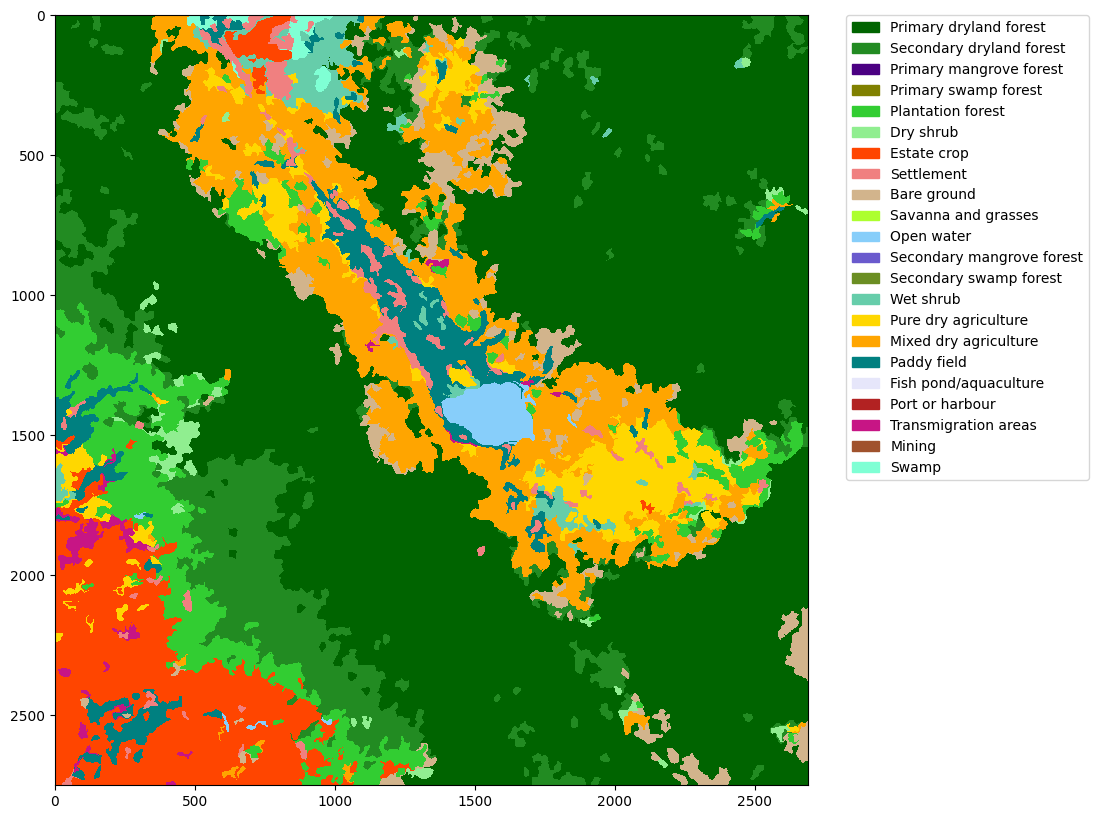
# Show to plot the segmented LC
plt.figure(figsize=(10, 10))
plt.imshow(lc_segment, cmap=cmap, interpolation="nearest")
plt.legend(**legend)

# Save image to geotiff
output = rio.open(
    "data/LULC_Segment.tif",
    "w",
    "COG",
    count=1,
    width=lc_segment.shape[1],
    height=lc_segment.shape[0],
    crs=landsat.crs,
    transform=landsat.transform,
    dtype="uint8",
    nodata=0,
    compress="lzw",
    resampling="mode",
    tiled=True,
)
output.write_colormap(1, dict_palette)
output.write(lc_segment, 1)
output.close()
# Convert raster to shapefile
lc_vector = [{ "type": "Feature", "properties": { "lc": x[1] }, "geometry": x[0] } for x in shapes(lc_segment.astype('uint8'), transform=landsat.transform)]
lc_vector = json.dumps({
    "type": "FeatureCollection",
    "properties": {},
    "features": lc_vector
})

# Read as geodataframe
lc_df = gpd.read_file(lc_vector, driver='GeoJSON')

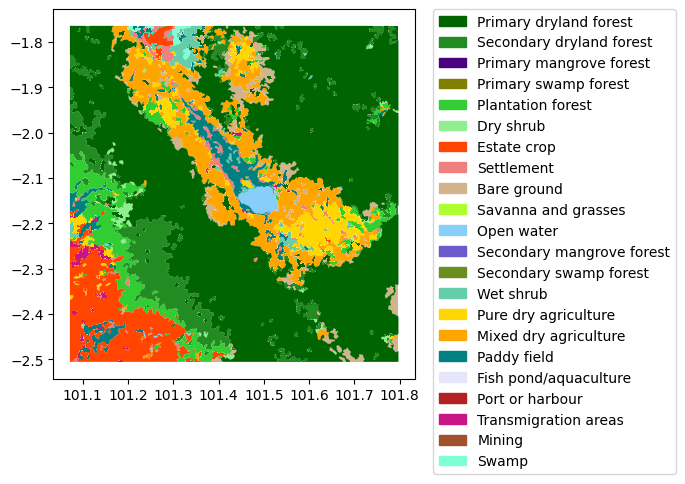
# Plot it
lc_df.plot(column="lc", cmap=cmap)
plt.legend(**legend)

# Add another column such as palette and label
lc_df["palette"] = lc_df["lc"].map(dict_palette_hex)
lc_df["label"] = lc_df["lc"].map(dict_label)

# Save the file
lc_df.to_file("data/LULC_Shapefile.shp")